
Kapwing is one of the best-known browser editors because it blends trimming, subtitles, AI features, and general media editing in one place. That is appealing when you create for social or need several content tasks in one editor.
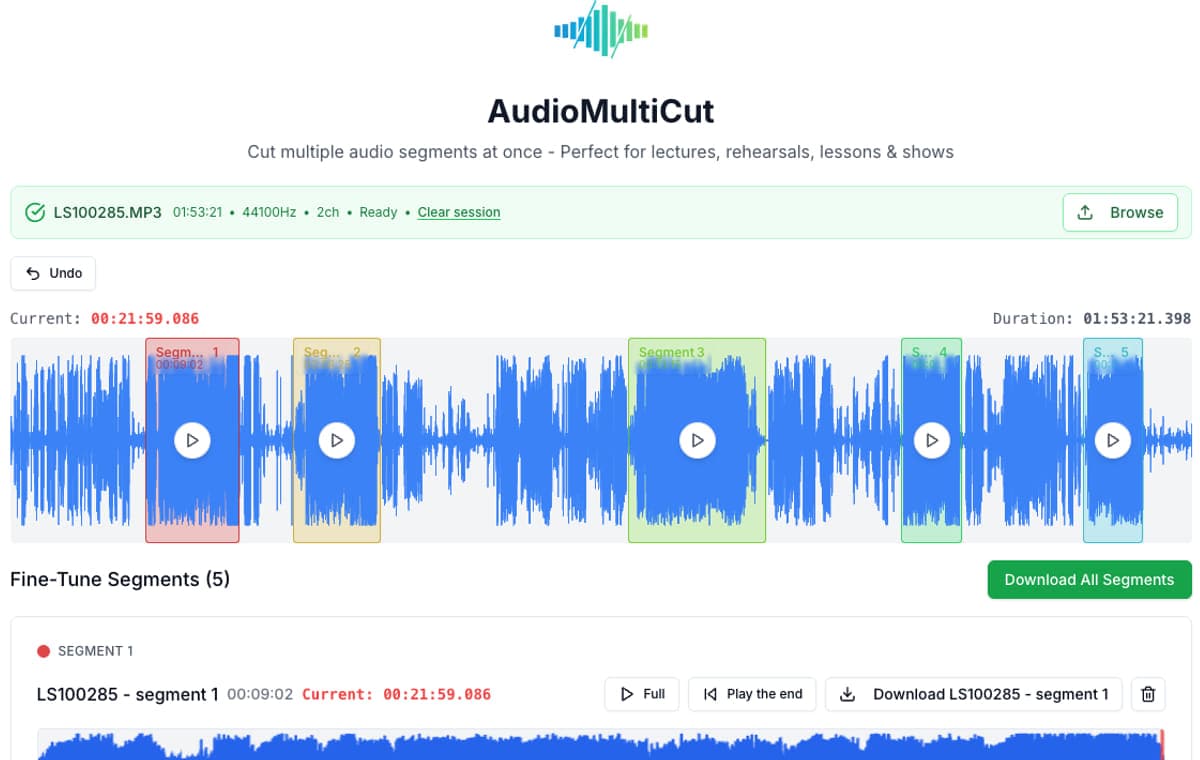
For long audio recordings, though, the best workflow is often the shortest one. AudioMultiCut is built specifically for repeated splitting, faster edge cleanup, and batch export from one source recording. The product is opinionated about experience: audio cutting should not feel like work before the work even starts.

AudioMultiCut vs Kapwing
| Metric | AudioMultiCut | Kapwing |
|---|---|---|
| Best use | Many clips from one audio recording | General online media editing with audio trimming included |
| Free-plan friction | Direct clipping workflow | Kapwing advertises free exports with watermark and a one-minute export limit |
| Mobile story | Strong fit for phone-first audio clipping | Kapwing promotes trimming directly in the phone browser |
| Trim refinement | Edge preview is optimized for repeated audio cleanup | Good general editor, but not built around segment-card trimming |
| Who should choose it | Musicians, educators, podcasters, and lesson workflows | Creators who also need subtitles, canvases, or broader media assembly |
When Kapwing is the right tool
Kapwing makes sense when the trim is only part of a bigger creative workflow. If you expect to pair the audio with visuals, captions, resizing, or social publishing, the broader editor can justify the extra complexity.
When AudioMultiCut is faster
AudioMultiCut is faster when you do not need the rest of that stack. Splitting a rehearsal into songs or a lecture into chapters is really a clip-management job, and the lighter workflow wins.
That is also where boundary preview matters. You can move an edge and immediately hear the first or last second you just changed, which makes repeated cleanup much less tedious. It is the same reason casual games work: the loop is direct, responsive, and satisfying instead of overloaded.
Bottom line
Kapwing is a better media suite. AudioMultiCut is a better audio splitter. If the end result is a folder full of clean clips, AudioMultiCut is usually the more direct choice.
FAQ
When is Kapwing the better pick?
Kapwing makes more sense when the trim is part of a bigger creator workflow with visuals, captions, canvases, or social formats.
Why does AudioMultiCut feel faster for long recordings?
Because it is built around clip management, not around a broader media project. That removes decisions and interface overhead from the workflow.
Is AudioMultiCut still better for one quick trim?
Often yes, especially if you care about quickly nudging the start and end by ear. The difference becomes even clearer once the job grows beyond one export.
Sources
Official product pages checked on April 4, 2026.
Compare more audio cutters
Better for audio-only work than a full online creator suite
VEED Audio Cutter Alternative for Faster Audio-Only Editing
VEED is a broad online media editor with audio cutting built in. AudioMultiCut is usually the better choice when you only need to split audio fast.
Compare audio cutters by real jobs, speed, and frustration level
Best Audio Cutter Alternatives for Splitting Long Recordings
The best audio cutter depends on the job. This guide compares AudioMultiCut with the biggest alternatives through 10 common real-world use cases, including how each one handles the work and how long it typically takes.
Compare audio cutters by friction, learning curve, and time to useful result
Audio Cutter Comparison Table: Features, Privacy, Ads, and Speed
A practical comparison of AudioMultiCut, Audacity, VEED, Kapwing, Clideo, and random free cutters based on the things that actually affect your workflow.
Use the simpler clipping workflow
Upload a recording, make the clips you need, and skip the extra creator-suite layers when they are not part of the job.